
Anchor
Intro to Anchor Proposals
Anchor 101 with Kristin Bradley—how to find your login information, review, and send saved proposals.
the transition from ignition to anchor: step by step
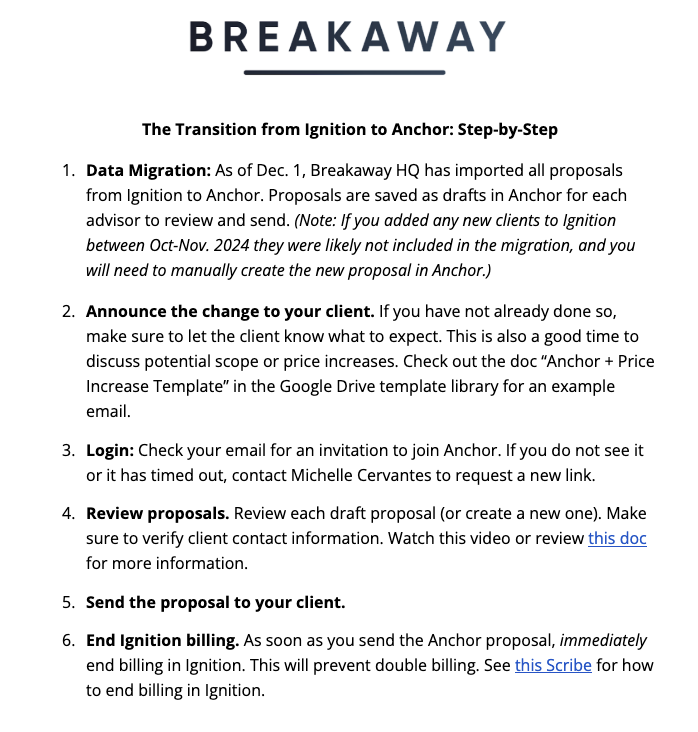
Click to view a step-by-step guide to go from Ignition to Anchor, including FAQs.
How-To Documents + Links
PDF: Review and Send an Anchor Proposal
Scribe: End Billing in Ignition
Best Practices to Onboard your Clients
Frequently Asked Questions
Q: Can I change the date on price increases once an engagement has been signed?
A: Yes. This will be considered an amendment and will need approval from your client. Go to your relevant agreement >Edit > for the service you want to amend click on Advanced settings > Set an automatic annual price increase.
Q: If I adjust the billing date to later in the month to align with their previous billing schedule, will this also require re-signing?
A: This will not require re-signing of the agreement. Go to the relevant agreement >click on Edit and amend the billing date of the service. It will notify your client of the amendment.
Client-Facing Articles
How to review and sign an Anchor proposal
How to set up a payment method
(Quick tip: clients should choose "Instant" to enter login details, "Manual" to enter account and routing numbers and trigger micro deposits.)
anchor help center
Check out the Anchor Help Center for a wide array of articles on:
Getting started
Sending proposals + managing agreements
Billing + payments
Integrations
And lots more!
our anchor representative
Reach out anytime with questions or issues.
Tamar Sasson // Director, Customer Success